AI Food Coach — The AI Calorie Counter That Actually Understands Your Diet
It's 6 PM. You've been tracking all day. You have 460 calories left and 42 grams of protein to hit your target. What should you eat for dinner? You open AI Food Coach and ask. The AI diet coach already knows your numbers — your deficit, your macro split, your weight trend, every meal you logged today. It doesn't give you a generic list of healthy dinners. It suggests what fits your remaining budget, right now. This is an AI calorie counter with a personal AI nutrition coach built in.
You log food by snapping a photo, speaking into your Apple Watch or Wear OS watch, scanning a barcode, or typing it in. No account to create: your meals, weight and goals are stored on your phone.
Your Personal AI Diet Coach
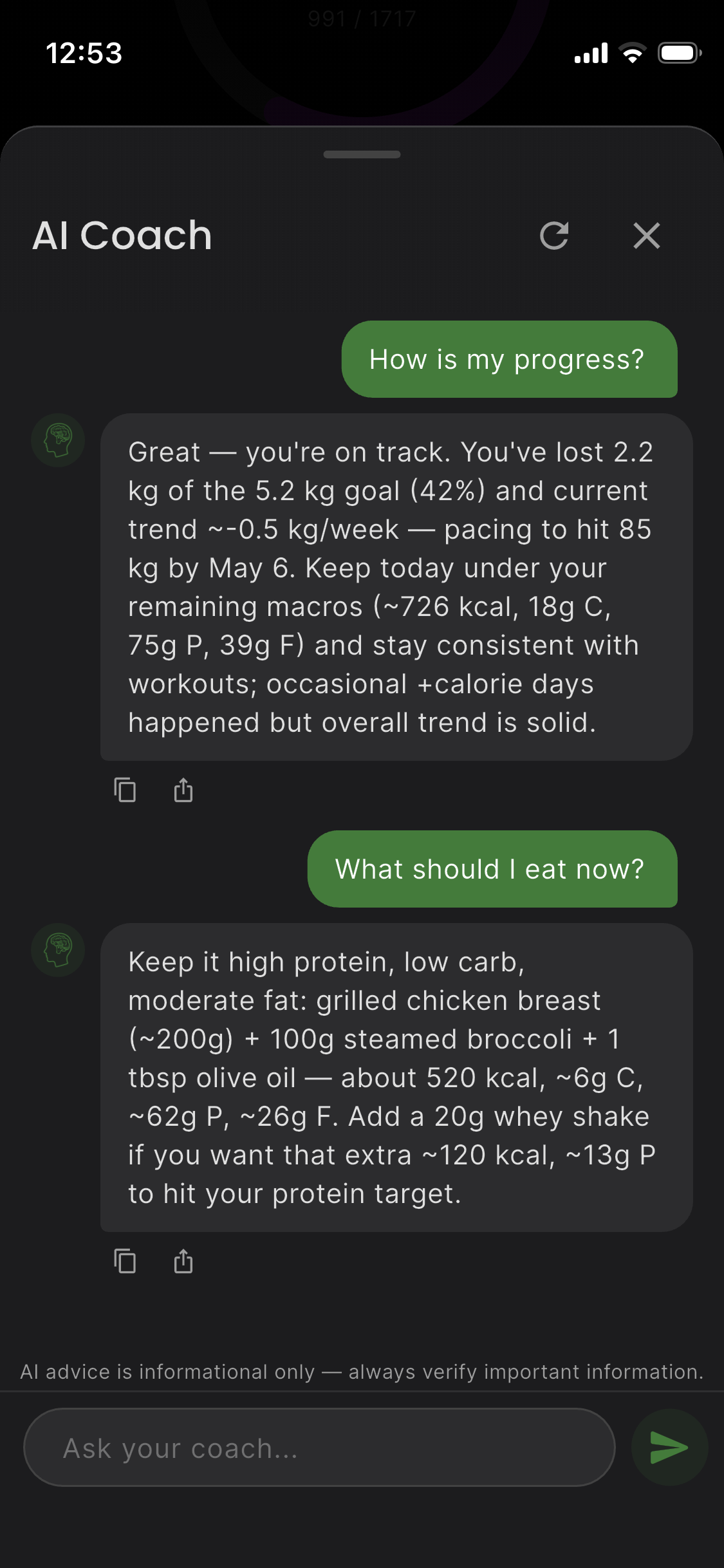
Tracking calories is one thing. Knowing what to do with them is another. AI Food Coach has a built-in AI diet coach that sees your full nutritional picture — not just today's totals, but your trends, your goals, and the context behind your numbers. When you ask it a question, the answer is grounded in your data.
It Knows Where You Stand Right Now
The moment you open the chat, your AI coach already sees your current situation. You've eaten 1,340 of your 1,800 calorie target. You've hit 78g of your 120g protein goal but only 8g of your 20g carb limit. Your weight has been trending down 0.3 kg per week. This isn't a guess — these are your real numbers, pulled from every meal you've logged.
Here's what the AI coach has access to every time you ask a question:
- Your calorie deficit — consumed vs. remaining, and whether you're on pace
- Your macro balance — protein, fat, carbs eaten today vs. your targets
- Your weight trend — the direction over weeks, not just today's number
- Your meal history — what you ate yesterday, three days ago, last week
- Your goals — target weight, weekly loss pace, activity level
- Your activity and sleep — workouts, steps and sleep from Apple Health or Health Connect, when connected
This means every answer is specific to this exact moment in your diet.
“What Should I Eat for Dinner?”
This is the question everyone on a diet asks at 6 PM. And this is where a coach matters. You have 460 kcal and 42g protein left. If you're doing keto and only have 6g of carbs remaining, the AI steers you toward high-protein, high-fat options that fit under that ceiling. If you have more carb room, it opens up different suggestions. The answer changes based on where you are today — not a static meal plan.
Ask: “What should I eat for dinner?”
The AI checks your remaining calories, protein gap, carb and fat budget, and responds with specific meal ideas that hit your numbers. Not “eat chicken” — but a meal suggestion that fits 460 kcal with 42g protein and under 6g carbs.
“Am I on Track This Week?”
End of the week. You feel like you've been consistent, but have you? Ask your AI coach. It looks at the last 7 days of your logged meals, calculates your daily averages, compares them against your targets, checks your weight entries, and gives you a straight answer with real numbers.
“Your average intake this week was 1,720 kcal against a 1,800 target. Protein averaged 118g (target: 120g). You logged weight twice — down 0.4 kg. You're on track.”
Or: “Wednesday and Thursday you went 300 kcal over target. Your weekly average is 1,950 kcal — 150 above your goal. Consider tighter tracking on busy days.”
No sugar-coating. Just your numbers and what they mean.
“Fix My Macros”
It's 3 PM and you've already hit 95g protein but only 28g fat — your AI macro tracker shows the imbalance clearly. You have 600 kcal left. What do you eat to balance things out without going over?
The AI calculates: you need roughly 45g more fat and only about 25g more protein to finish the day balanced. It suggests foods that are high-fat, moderate-protein — avocado, macadamia nuts, olive oil drizzled on a salad — calibrated to your remaining budget. If the situation were reversed (low protein, high fat), you'd get completely different suggestions.
The coaching adapts in real time to wherever your macros actually are.
“Keto Coaching That Gets It”
AI Food Coach was built with keto in mind. The AI coach understands net carbs and keto-friendly foods — and answers every question in the context of your carb budget.
Ask “Is avocado good for me right now?” and the coach doesn't give you a Wikipedia answer. It checks the net carbs the avocado adds against the 6g you have left today — it fits — and what it does to your fat and calorie totals. Ask the same question when you have 0g carbs left, and you get a different answer.
Going to a restaurant tonight? The AI knows your remaining macros and tells you what types of dishes to look for and what to avoid — specific to your numbers, not a generic “choose grilled over fried.”
It Sees the Whole Picture
The AI coach has your full nutritional context — your deficit, your macros, your weight trend, your goals — and uses all of it together when answering. It doesn't look at one number in isolation. It sees the full picture and gives you advice that accounts for everything at once. The coach answers in your phone's language.
No account, no name, no e-mail
Your chat history is kept on your phone. What you send reaches the AI without your name, your e-mail or any ID — what goes where.
How You Log Food
The AI coach is only as good as the data it has. AI Food Coach gives you four ways to log every meal:
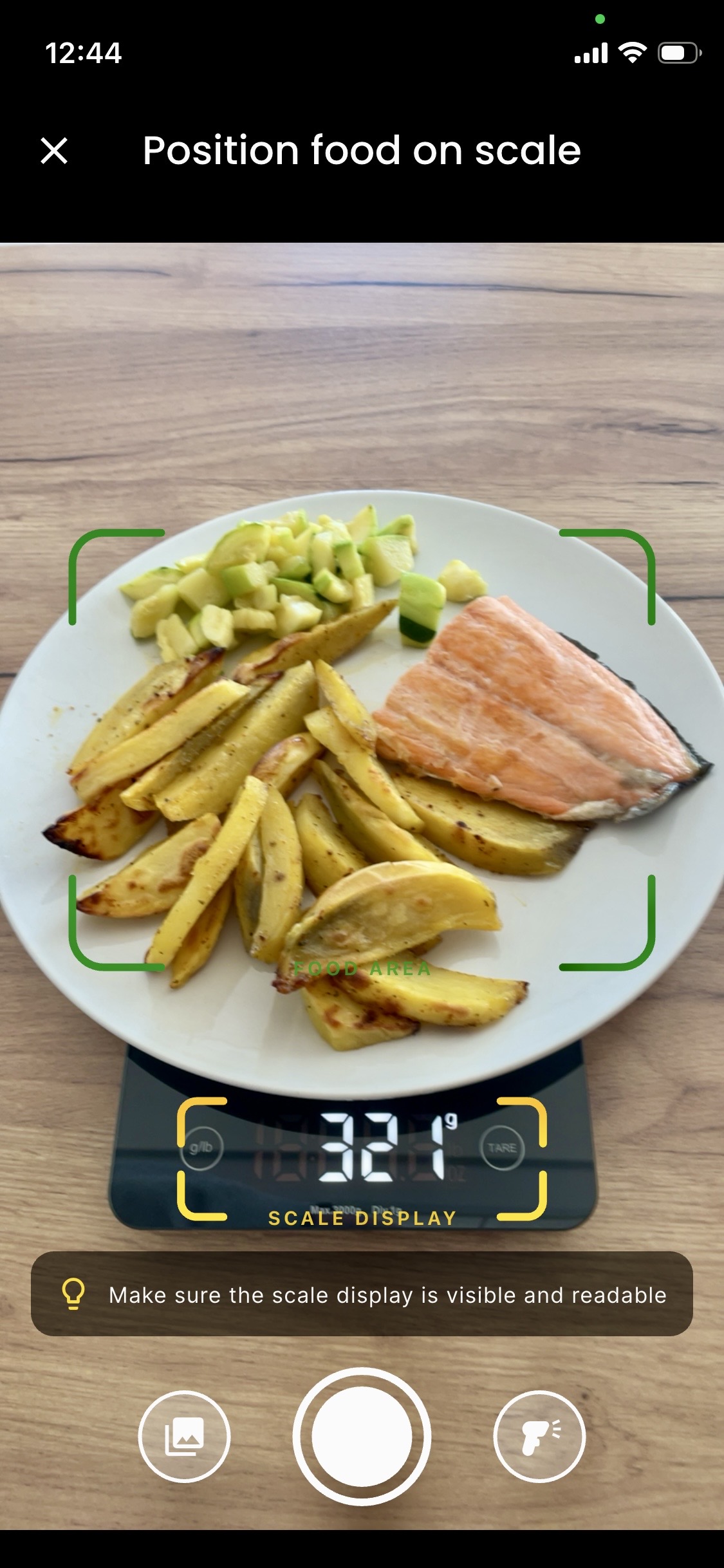
- Photo on Scale: Place your food on a kitchen scale, snap a photo. The AI identifies what's on your plate and reads the weight from the scale display, then estimates the nutrition for that weight, guided by USDA reference values. Multiple foods on one plate? It identifies each separately. You check the result and can correct it before saving.
- Voice on your watch: Raise your wrist on an Apple Watch or a Wear OS watch, say “chicken breast 200 grams and rice 150 grams” — check it and log it. More on this below.
- Barcode Scanner: Scan a packaged food and the app looks it up in the Open Food Facts database.
- Quick Add + Manual Entry: Search the foods you logged before and the app's food database, or type a food name or its macros.
Works with home-cooked meals
No barcode needed. The AI recognizes real food — what you actually cook and eat at home.
Smart Calorie & Macro Tracking
AI Food Coach tracks 9 nutritional values: calories, protein, carbs, fat, fiber, sugar, sodium, cholesterol, and saturated fat. With Apple Health or Health Connect connected, your TDEE uses the resting and active energy recorded there — your watch's estimates — instead of a formula; without it, a formula from your profile and activity level. Your calorie target moves with the activity recorded each day.
- Your calorie target: your TDEE minus the deficit your goal needs (plus a surplus when you build muscle), plus the thermic effect of the food you eat. With Dynamic Deficit on (the default), the app re-plans it every day and after every weigh-in from your 7-day average weight
- Progress charts: Track calories and macros over 7, 30 or 90 days, or since your goal started
- Weight tracking: Log weight entries and watch your trend toward your goal
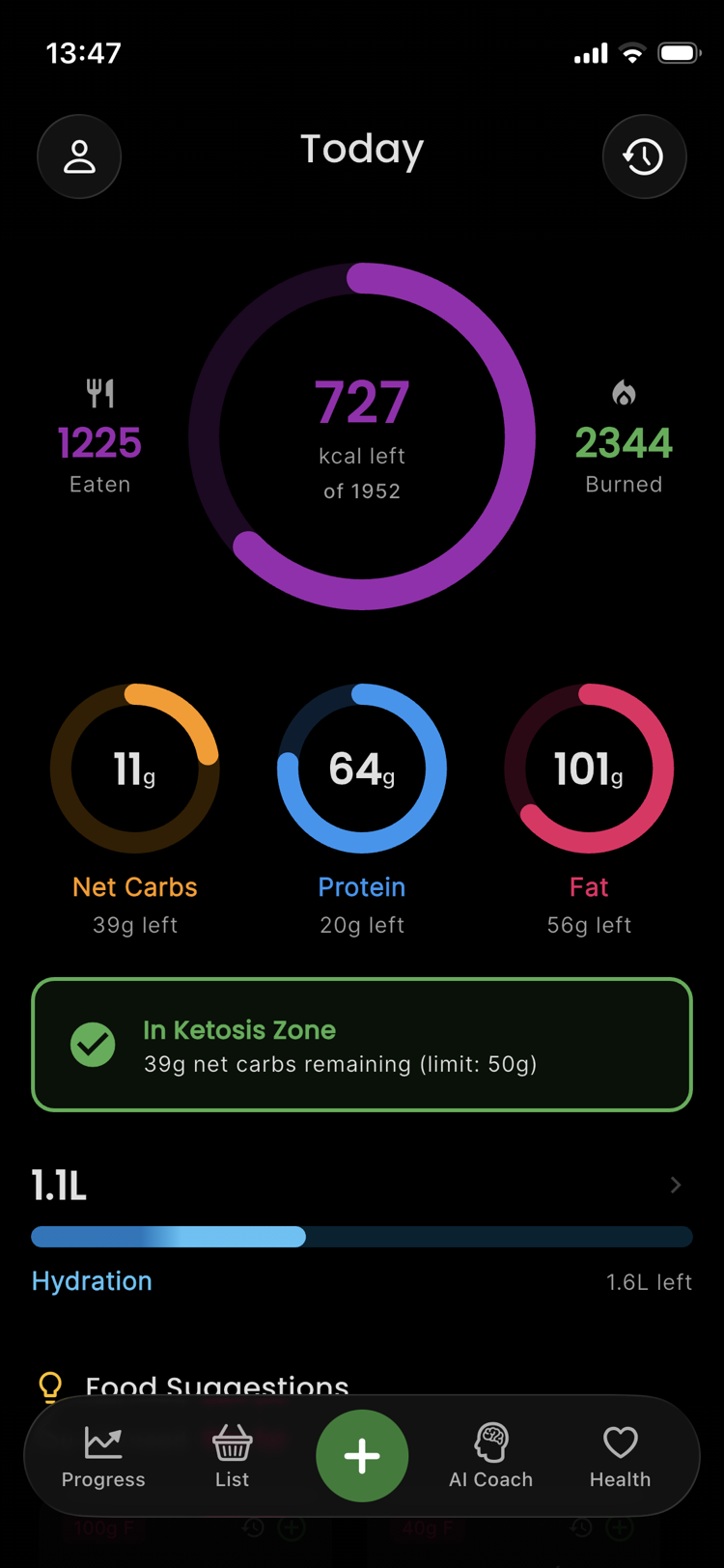
9 nutritional values tracked — calories, protein, carbs, fat, fiber, sugar, sodium, cholesterol, and saturated fat. With Apple Health or Health Connect connected, every meal is written there too.
Log Food From Your Wrist
The Apple Watch app (with an iPhone) and the Wear OS app (with an Android phone — Samsung Galaxy Watch, Google Pixel Watch and other Wear OS watches) let you log food by voice. Say what you ate, check the grams, confirm with one tap. The meal syncs to your phone automatically.
- Voice dictation: Describe your meal naturally — the AI understands portions, multiple items, and different languages
- Macro rings: Calories, protein, carbs, and fat progress at a glance on your wrist
- Complications and tiles: Macro rings and calorie progress directly on your watch face — and on Wear OS, tiles for your macros and water
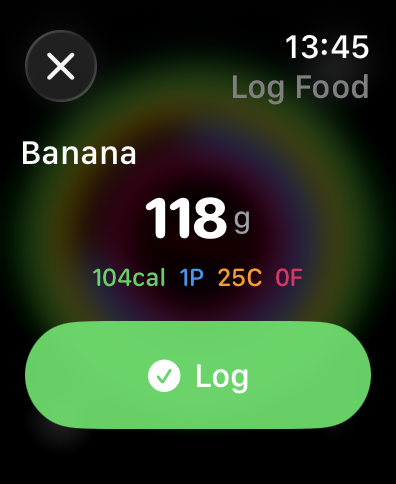
Everything each watch does, with screenshots: the calorie counter for Apple Watch and the calorie counter for Wear OS and Galaxy Watch.
Raise your wrist, say what you ate, done
Food logging from your wrist — without your phone, too, on Wi-Fi or cellular.
Your Data: What Stays on Your Phone
Your meals, weight, goals and chat history are stored on your phone. There is no account — no name, no e-mail, no sign-up.
The AI features send what the answer needs over an encrypted connection to our server, which passes it to OpenAI. Photo on Scale and food descriptions — typed, or spoken on the watch — send the photo or the text. The AI Coach, in the app and on the watch, and its Coach insights on the dashboard work only with your consent (Settings → AI Coach) and also send the numbers the coach works with: your profile, goal and meals, and the activity and sleep from Apple Health or Health Connect. Our server knows you only by a random ID — no name, no e-mail — and OpenAI gets no ID at all. Our server keeps no content: its log holds that ID, how much AI processing the request used and what it cost — not what you sent. OpenAI does not use API data to train its models (OpenAI: data controls). The details are in our Privacy Policy.
No account. No name. No content kept on our server.
Frequently Asked Questions
Meet Your AI Diet Coach
Download free. Ask your first question tonight.